Eight Mac desktop pets compared: typing companions, roaming animals, reminders, and chaos, with real user-review tradeoffs.
By John Johnson· Paw-Paw team
· Updated October 7, 2026
· 8 min read
The short answer
For a free, native macOS pet that reacts to typing, use Paw-Paw, our free desktop pet for Mac. For pets that wander across your desktop, use Pets Therapy. For a menu-bar pet with a Pomodoro timer, use Mac Pet. For 3D anime characters on Apple silicon Macs, use Desktop Mate. For classic Shimeji packs without Java, Shijima is an archived beta to investigate carefully. The rest of this post explains when each one is the right pick.
Disclosure. We make Paw-Paw and list it first. No other app paid to be included.
At a glance
Eight apps, side by side
US list prices; pricing and requirements can change.
App
Price
Shape
Reacts to typing
Pets roam
Published Mac requirement
Open-source licence
Paw-Paw
Free + optional $2.99 collection
Desktop character
Yes
No
macOS 13+; universal
No public licence
Pets Therapy
Free + annual/lifetime IAP
Desktop creatures
No
Yes
macOS 12+
Not listed
Mac Pet
$9.99
Menu bar / notch
No
Menu bar
macOS 10.15+
Not listed
Desktop Mate
Free + paid DLC
3D desktop characters
Cursor-focused
Yes
Mac beta; developer: macOS 26+; Apple silicon
Not listed
Shijima
Free
Shimeji characters
No
Yes
Archived Mac beta; untested release
GPLv3
Desktop Goose
Name your own price
Chaotic goose
No
Yes
macOS 10.10+
Not listed
NotiSprite
Free + premium IAP
Roaming pet + reminders
No
Yes
macOS 14.6+
Not listed
Bongo Cat
Free + DLC/items
Desktop character
Yes
No
macOS 11+; Intel/Apple silicon
Not listed
1Typing reactor
Paw-Paw
Free · optional $2.99 collection · macOS 13+ · Native Swift · Apple silicon + Intel
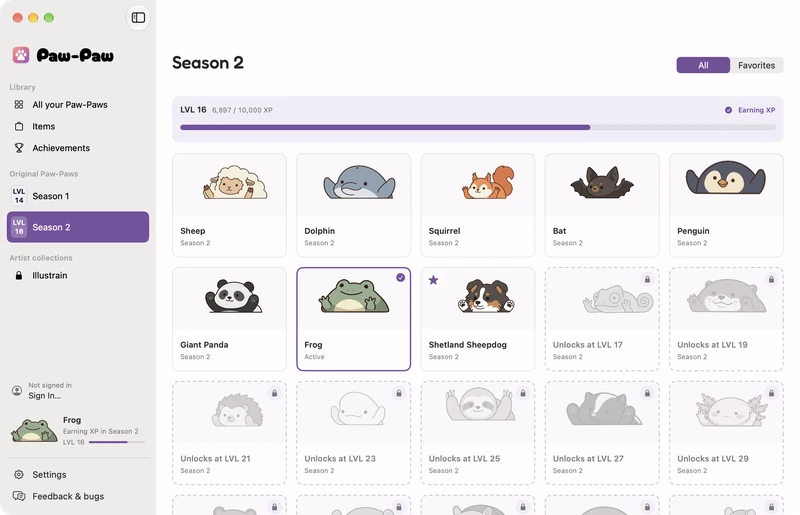
Paw-Paw sits where you put it and reacts to typing and clicks. Both free seasons include dozens of animals and more than 100 wearable items, unlocked through play. No ads, subscription, Steam, or account required.
Click-through and hide controls keep it out of the way: hide for an hour, during full-screen use, or in specific apps. Bring it back from the Dock menu.
Accessibility access enables reactions; Secure Input can suppress them. Typed content is never logged or transmitted; aggregate key and click totals stay local. The Mac download is signed and notarized for Intel and Apple silicon.
Paw-Paw 0.2.1’s Library. See the Mac setup guide for installation and typing reactions.
Best for
Typing reactions, collectible items, and a stationary companion.
Free download · $5.99/year or $12.99 lifetime IAP (US) · macOS 12+ · App Store
Pets Therapy brings small roaming creatures to your desktop rather than reacting to typing.
What users say.App Store reviewers enjoy playful company while working. A June 2025 desktop review reported fullscreen/gravity problems; April 2026 reviewers reported missing favorite pets after an update, with one describing recovery through support. Check recent reviews for the current version.
A pixel pet in your menu bar or beside a MacBook notch. Its Pomodoro timer changes the pet’s behavior between work and breaks, with activity streaks and session history.
Best for
Pomodoro sessions with a small menu-bar companion.
Free to start · Steam · macOS Apple silicon only · paid character DLC
3D characters sit on windows and react to your cursor, with licensed characters sold as DLC. The Mac beta announcement requires Apple silicon and macOS 26+. Steam lists macOS 12+, so check the developer’s requirements before downloading.
What users say. A September 2026 Mac reviewer likes the voices and Mission Control behavior but finds DLC expensive. Other reviews criticize limited customization and lost mod support.
Best for
Licensed 3D anime characters on Apple silicon.
Not great if
You use Intel, want a direct download, or expect free custom models.
Shijima-Qt runs Shimeji character packs without Java. Its repository was archived in April 2026, and the Mac release is explicitly untested. macOS rejected the v0.1.0 Apple silicon download during signature validation on October 7.
What users say.itch.io users like the no-Java setup and multiple characters, but report import and launch problems. A February 2026 Apple silicon report records a missing-library failure. Shijima-Web is a separate product.
Best for
Technical users exploring Shimeji packs who accept an archived beta.
Donationware · macOS, Windows · itch.io · since 2020
A deliberately mischievous goose brings memes and notes onto your screen and steals the cursor. The official listing offers Mac v0.22 for macOS 10.10+.
What users say.itch.io comments range from enjoying the antics to finding extra windows and cursor capture annoying. Some Mac users report interference with normal use. The developer’s quit control is holding Escape for several seconds.
Best for
A funny, disruptive desktop prank.
Not great if
You dislike interruptions or losing control of the pointer.
A roaming pixel pet that follows your pointer, sits on windows, and offers reminders. The Mac app includes five free sprites; widgets and Dynamic Island features belong to the separate iOS version.
What users say.Mac reviewers praise animation, appearance controls, and stretch/sleep reminders. Check the available customization options before paying.
Best for
Roaming pets with reminders on newer Macs.
Not great if
You want typing reactions or use macOS 14.5 or older.
More specialized options; the first five listings were checked October 3, 2026.
PebbletsIO: roaming 3D pets that dance to music. Free starter pet; extras about $3.99–$5.99 each. Apple silicon, macOS 14+.
DeskPet: turn your own videos or GIFs into a floating pet. $2.99; macOS 15.6+.
Peekoo: photo-based pets riding your windows. Free tier, subscription/lifetime extras; macOS 14+, Intel and Apple silicon; Input Monitoring required.
MacPet: a motion-reactive pet face for Apple silicon MacBooks. $4.99 unlock; macOS 13+. A different app from Mac Pet above.
RunCat Neo: a menu-bar cat reflecting CPU activity. Free with tips, Apache-2.0; macOS 26. Four July–September reviews split between cute metrics and missing runners from the earlier app.
Weyrdlets 2.0: paid Steam pets, a separate world and minigames. Apple silicon, macOS 13.2+.
Rusty’s Retirement / Tiny Pasture: Steam idle farming games that occupy part of your desktop.
Oneko: free open-source cursor-chasing cat; Mac ports vary in upkeep. See our Mac guide.
Classic Shimeji: Java character packs, primarily Windows-oriented; Mac forks vary in setup.
How to pick one
Choose typing reactions, roaming, reminders, or deliberate chaos first. Then check your Mac requirements, hide/quit controls, included pets, paid extras, and customization. If you already own favorite characters, check whether updates and purchase restoration preserve them.
Frequently asked questions
Is there a free desktop pet for Mac?
Yes. Paw-Paw includes two free seasons, with an optional USD 2.99 artist collection. Bongo Cat and Pets Therapy are free to start with paid extras. Desktop Goose is name-your-own-price.
Does Bongo Cat work on Mac?
Steam offers a Mac build for Intel and Apple silicon. However, September 2026 Mac users reported OS Error 0 at launch. Check the Mac discussion thread for your setup.
What is the best desktop pet for macOS in 2026?
For typing reactions, Paw-Paw is our pick. Choose Pets Therapy for roaming animals, Mac Pet for Pomodoro sessions, or Desktop Mate for licensed 3D characters on Apple silicon.
Do desktop pets slow down your Mac?
Resource use varies by app, hardware, and settings. Check Activity Monitor on your Mac if performance matters.
Do desktop pets work on a MacBook?
Yes, subject to each app’s requirements. Paw-Paw runs on Intel and Apple silicon MacBooks with macOS 13+, with draggable placement and three sizes.
Why do some of these apps need Accessibility permission?
System-wide keyboard and mouse reactions may require Accessibility access. Paw-Paw observes event types; typed content is never logged or transmitted. Aggregate key and click totals stay local.
Are desktop pets good or bad for focus?
That depends on you and the app. Try one with easy hide/quit controls, and remove it if motion or interruptions become distracting.
Paw-Paw is free.
Both seasons, with dozens of Paw-Paws and more than 100 items, unlock through play at no extra charge. No subscriptions or ads, no account needed, and optional paid collections. Native macOS, reacts as you type in most apps once Accessibility access is granted.