Cozy productivity apps for Mac, and which ones help you focus
Seven warm Mac apps in three groups: focus timers, desktop companions and a cozy look, with price, minimum macOS, and whether each one helps you work or just makes your desk nicer.
By John Berger· Paw-Paw team
· October 24, 2026
· 8 min read
The short answer
For a cozy focus timer, try Focus Kitty, a Pomodoro timer with a cat (macOS 15+), or Paw-Paw, our free desktop pet with a focus timer (macOS 13+). For a calm timer that can also block distracting apps and sites (a paid extra), look at Session or Flow. Clowder and Dockitty are company, not focus tools: Dockitty’s own site says so. For a cozy look, a theme app such as Cozy changes your wallpaper, folder icons and widgets together. Forest and Focus Friend are built for phones and tablets, not the Mac.
Disclosure. We make Paw-Paw. It sits in the desktop companions group, because that is what it is first. No other app paid to be included. Prices are US App Store or official-site prices, checked on October 24, 2026; they change, and they vary by region.
At a glance
Seven Mac apps, as of October 2026
App
Group
Price
Minimum macOS
Helps you focus?
Suits
Focus Kitty
Focus timer
Free + in-app purchases
macOS 15
Yes, Pomodoro
A cute cat timer on Mac and iPhone
Session
Focus timer
Free; Pro $4.99/month or $39.99/year
macOS 10.15
Yes; blocking is Pro
Blocking apps and websites, planning around your calendar
Flow
Focus timer
Free; Pro from $2.99/month
macOS 15
Yes; blocking is Pro
A minimal work and break timer in the menu bar
Paw-Paw (ours)
Desktop companion
Free
macOS 13
Focus timer, break reminders
Company that types along and cheers you on
Clowder
Desktop companion
Free
macOS 13
No, just company
Cats that peek out when you hover
Dockitty
Desktop companion
Free; more cats from $2.99
macOS 14.6
No, “mostly vibes”
A pixel cat living in your Dock
Cozy
Cozy look
Free to try, one purchase for all themes
macOS 14
No, it changes the look
A whole desktop theme in one click
Focus timers
These three are built around a timer. One is openly cute; the other two are calm and minimal.
1Pomodoro with a cat
Focus Kitty
Free to download · Pro $2.49/month or Lifetime Premium $24.99 (US App Store) · macOS 15+ · iPhone, iPad, Mac
A Pomodoro timer with a cartoon cat that keeps you company. Its App Store listing says the cat reacts to the session and rests during breaks, alongside a task list, stats with streaks, and sounds such as rain. Premium adds cat styles, custom timers and more sounds.
Best for
A classic Pomodoro with a cute cat, on both your Mac and your iPhone.
Free plan · Pro $4.99/month or $39.99/year (US) · macOS 10.15+ · Mac, iPhone, iPad · App Store or direct download
Session is built around 25-minute focus sessions and asks what you got done when each one ends. The free plan gives you unlimited sessions and breaks and your last two days of analytics. Pro, per its pricing page, adds custom lengths, sync between devices and, on the Mac, blocking of the apps and websites you choose while a session runs (in Safari, Chrome, Brave and Microsoft Edge).
Best for
Serious focus blocks with app and website blocking and a short review afterwards.
Not great if
You want blocking without a subscription, or a character on screen.
Free basics · Pro $2.99/month, $17.99/year or $39.99 once (US App Store) · macOS 15+ · iPhone, Mac, iPad, Apple Watch
Flow calls itself “a stylish focus timer for everyone”. On the Mac it sits in the menu bar with no Dock icon, alternates work with short breaks and keeps statistics. The basics are free, with no ads or sign-up. Its pricing page puts app and web blocking, custom durations and calendar sync in Pro.
Best for
A clean work-and-break timer in the menu bar that also runs on your phone and watch.
Not great if
You want something playful rather than minimal, or your Mac is older than macOS 15.
These keep you company on your desktop. Only one has a timer.
4Our app · companion with a timer
Paw-Paw
Free · optional collections bought once · macOS 13+ · Apple silicon + Intel · direct download
A small animal sits above your windows, by the Dock at first, and taps its paws as you type and click. Each level brings a gift with an item to wear. Since October 2026 it also has a focus timer and gentle break reminders; there’s more on both below.
Best for
Quiet company that types along with you, cheers you on now and then, and runs a timer when you ask.
Not great if
You want app or website blocking, a task list, or a fixed Pomodoro schedule.
Free · macOS 13+ · Apple silicon + Intel · Mac App Store
Hover your mouse and cats peek out from their hiding spots on your desktop. Its store listing calls it “a lightweight desktop companion”. There is no timer or tracking. Its latest version, 1.0.2, is from January 29, 2025.
Best for
A free, small moment of joy when your cursor wanders.
Not great if
You want help focusing, or an app that gets regular updates.
Free with two cats · more cats from $2.99 (US App Store) · macOS 14.6+ · Apple silicon + Intel · Mac App Store
A tiny pixel cat that lives in your Dock: the cat is the app icon. You pick and name your cat, let it roam the screen, and right-click to make it jump or sleep. Its developer, Lazare Kolebka, says in an App Store reply that two cats are free and the rest are optional purchases. Its own site is refreshingly honest: “Not a productivity tool but somehow it helps”, and its features list starts with “Mostly vibes”.
Best for
A playful pet in a part of the screen you look at all day anyway.
For more companions, including roaming pets and menu-bar pets, see our best desktop pets for Mac roundup.
A cozy look
Sometimes “cozy” just means a desk you like looking at.
7Whole-desktop themes
Cozy
Free to try with one theme · one purchase unlocks every theme · macOS 14+ · Mac App Store
Cozy applies an illustrated theme to your whole desktop: wallpaper, folder icons and, where the theme has them, widgets, all drawn together as one scene. One theme is free; one lifetime purchase unlocks the rest, with no subscription. The scenes are still pictures, not live wallpapers.
These details come from Cozy’s guide to aesthetic Mac apps, written by its founder, who says so plainly: “Cozy is our app, so weigh that as you read.” Read it the way you read this page.
Best for
A finished, matching desktop without hunting for icons yourself.
Not great if
You want a moving wallpaper, or anything that helps you focus.
You can get far without any app: wallpaper, custom folder icons and widgets are built into macOS. Our guide to making your Mac desktop cute walks through it.
What about Forest and Focus Friend?
Both show up in cozy-focus lists, and both are phone apps first: neither had a native Mac app that we could find on October 24, 2026.
Forest grows a tree while you stay off your phone. Its site lists iPhone, iPad, Android and a browser extension. See Forest app for Mac.
This part is us describing our own app, so here is what it does and what it doesn’t.
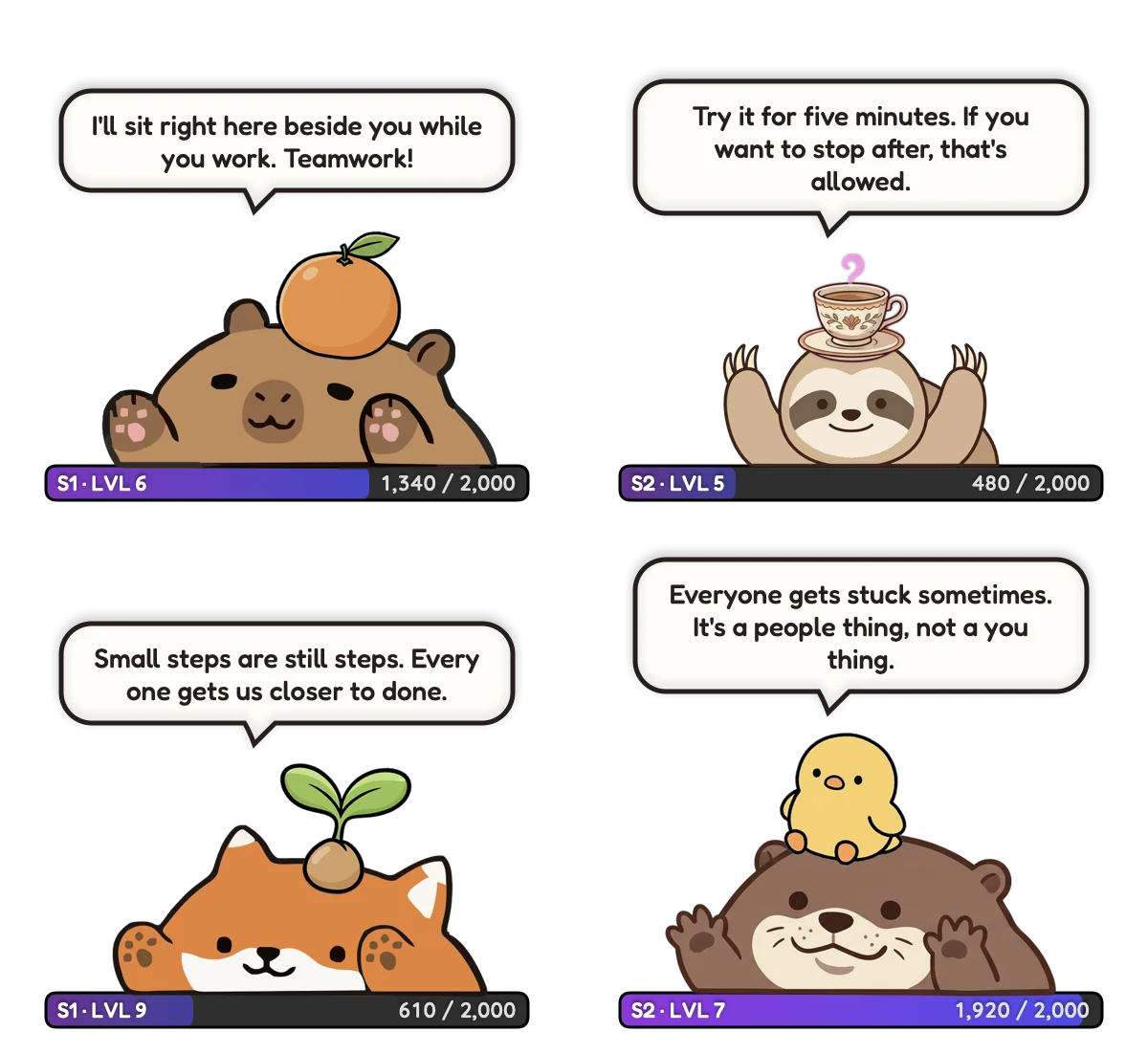
Paw-Paw started as company: a small animal that types along with you, naps when you rest, and now and then offers a kind word when your pace dips well below your own usual pace. It compares you only with yourself, and nothing bad happens while you’re away: no hunger, no guilt, no streak to lose. That’s why we put it with the companions. Our digital body double article covers the thinking behind it.
Four real encouragement lines as the app shows them, each Paw-Paw with its XP bar underneath.
The focus timer. Right-click your Paw-Paw and choose When Clicked › Start Focus Timer. From then on, a click opens a little timer bubble with a slider from 1 minute to 3 hours. You set it each time, like a kitchen timer, and the XP bar counts down the minutes. At the end, your Paw-Paw cheers and offers a break sized to the session: 5 minutes after 25, 10 after an hour.
Break reminders. After a long stretch of work, it suggests a stretch, a walk or some water. Since version 0.6.3, Settings › Notifications › Breaks has four separate reminders (get up and move, stretch, drink water, rest your eyes), each with its own timer, and you can turn any of them off.
Stats. A Stats page in the Library shows today’s keys and clicks, your active minutes, your busiest two hours and the last 30 days. It counts activity, not output, and never what you type. Stats stay on your Mac, or privately in your account if you sign in.
The limits. Paw-Paw asks for macOS Accessibility access when you turn on XP, so it can notice key presses and clicks; it counts them and never records what you type. It has no app or website blocker and no task list, so if blocking is what you need, Session Pro or Flow Pro will suit you better. And we have not studied whether Paw-Paw makes anyone more productive, so we don’t claim it does. For more, see whether cute things help you focus, the guide and our typing pet for Mac page.
How to pick one
Start with what you want from “cozy”. For help starting and stopping work, pick a timer: Focus Kitty if you also want it on your iPhone, Paw-Paw if you want a companion on screen all day, Session or Flow if you want blocking (a Pro feature in both). For a desk that feels less empty, a companion such as Clowder, Dockitty or Paw-Paw. For a warm look, macOS itself plus a theme app like Cozy.
Then check your macOS version (Focus Kitty and Flow need macOS 15, Dockitty 14.6, Cozy 14) and whether you mind paying for extras. Studying with ADHD in mind? See our ADHD study companion page.
Frequently asked questions
Is there a Forest app for Mac?
Not a native one that we could find in October 2026. Forest’s own site lists iPhone, iPad, Android and a browser extension for Chrome and Firefox. Focus Kitty, Flow and Session are timers that run natively on a Mac. Our Forest app for Mac page has more.
Is Focus Friend available on Mac?
Not as a Mac app of its own. Its App Store listing is designed for iPad and says “Not verified for macOS”. On a Mac with an M1 chip or later you can install the iPad version, with no promise it works well. Our Focus Friend alternative page compares desktop options.
Which cozy Mac apps are free?
Paw-Paw and Clowder are free. Session, Flow, Focus Kitty and Dockitty are free to download, with paid extras: app and website blocking is part of Session Pro and Flow Pro, and Dockitty sells more cats. Cozy is free with one theme. Prices were checked on October 24, 2026 and can change.
Do desktop pets help productivity?
Not by themselves, and the honest ones say so: Dockitty’s own site calls it “not a productivity tool”. A pet can make your desk feel less empty. If you want help focusing, pick an app with a timer, such as Focus Kitty or Paw-Paw, or with app and website blocking, such as Session or Flow (a Pro feature in both).
How do I make my Mac desktop cozy?
Start with what macOS already has: a warm wallpaper, custom folder icons through Get Info, and desktop widgets. For a matching look in one go, a theme app such as Cozy sets them together. Our guide to making your Mac desktop cute has the steps.
Sources
Focus Kitty: Pomodoro Timer, US App Store listing (price, in-app purchases, macOS 15.0 requirement, description).
Dockitty, dockitty.app (features, own description, compatibility) and its Mac App Store listing (macOS 14.6 requirement, in-app prices, developer reply).
Sources checked October 24, 2026. Prices and requirements can change; check the store listing before you buy. Paw-Paw has not been studied as a productivity tool.
A cozy friend for your Mac
Free, with no ads, subscription or account. A tiny animal that types along, rests when you rest, and keeps time when you want to focus.