Player guide
How Paw-Paw works
XP, levels, seasons, gifts, items and achievements, explained in one place.
Type and click as usual. Every key press and click earns XP for the season or collection you choose. Each level brings a gift with an item to wear, some levels unlock a new Paw-Paw, and achievements reward what you discover along the way.
New to Paw-Paw? Start with the installation guide, and make sure you have the latest version: this guide describes the latest version (0.2.3).
XP and levels
Every key press and every click earns 1 XP for your Paw-Paw, and the XP bar under it fills toward the next level. The first levels come in minutes; later ones take longer. There is no top level, so you can keep going for as long as you like.
Holding a key down, or hammering the same key very fast, earns nothing while Pause XP for repeated input is on (it is by default, in Settings › Progress), so levels reflect real typing. Paw-Paw counts presses and clicks, never what you type; what a typing pet does on your Mac explains the rest.
On Fire
Keep up steady activity for about ten seconds, then type or click fast, and your Paw-Paw goes On Fire: every key press and click earns 2× XP, a thin rainbow strip with a small flame runs along the XP bar, and fiery paw prints rise from its paws. It lasts as long as you keep the pace and cools a moment after you slow down.
Seasons and collections
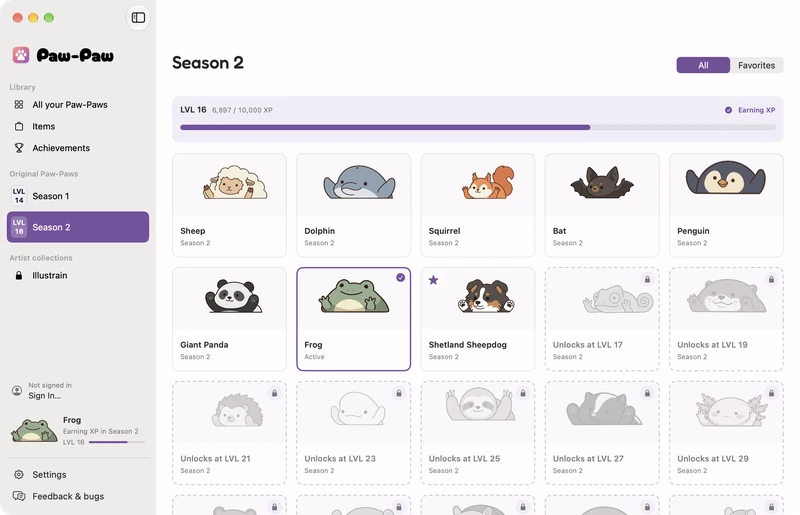
Paw-Paws and items come in seasons. Season 1 holds the original Paw-Paws and Season 2 adds many more. Both are free, both are open from the start, and seasons never expire. Collections are drawn by guest artists: the Illustrain Collection is the first, a one-time purchase.
Each season and collection has its own level, and only one earns XP at a time. Choose it with Earn XP In in your pet's right-click menu, Earn XP Here on a progress card in the Library, or in Settings › Progress. Wearing a Paw-Paw from another season doesn't move your XP, unless you switch on XP follows my Paw-Paw in Settings › Progress.
Gifts
Every level brings a gift. Pick one of the three gift balls (click one, or press 1, 2 or 3) to reveal an item, then choose Wear It to put it on or Add to Items to keep it for later. Items come in four rarities, Common, Uncommon, Rare and Legendary, and rarer ones turn up more often as your level rises.
Gifts that arrive while you're busy wait above your pet. With two or more waiting, Open All opens them in one go. A gift left open closes by itself after a while, and you keep what was inside. On a slow day your Paw-Paw may also hand you a little encouragement gift, at most once a day. Once you have found every item, later gifts are saved and become new items when new ones arrive.



Items
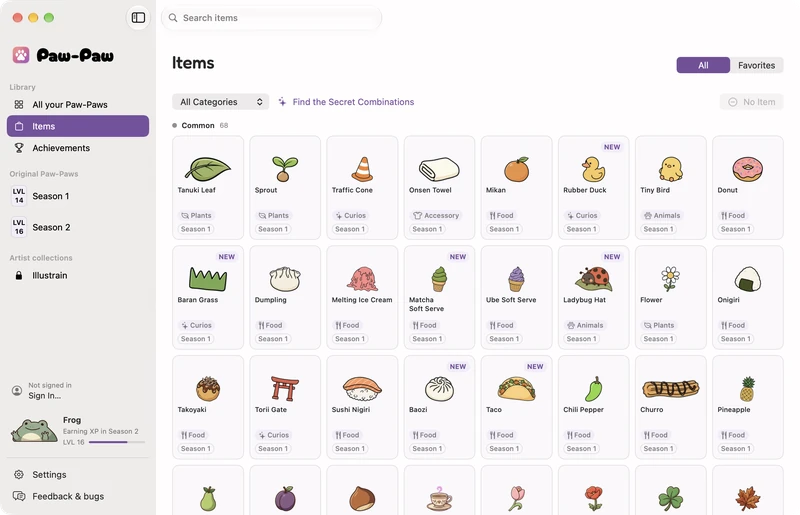
Items are the little things your Paw-Paw wears on its head: food, plants, animals, drinks, accessories and curios. Wear one from the Items page in the Library, by dragging it onto your pet, or with Change Item in the right-click menu.
To move, resize or tilt an item, choose Adjust Item… or click the item on your pet, then click Done. Star the items you love and they appear in the Change Item menu.
Paw-Paws
Each season and collection unlocks its Paw-Paws as you level it up, and the Library shows which are still to come. When a level unlocks a new Paw-Paw, a card offers Switch to wear it straight away. You can change Paw-Paws any time in the Library or with Change Paw-Paw in the right-click menu; starred favorites appear in that menu.
Achievements
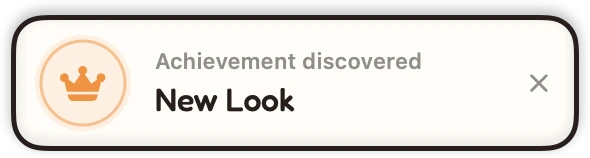
Achievements are permanent badges for the things you do. Companions and Style reward time with your Paw-Paws and dressing them up, and Secrets reward discoveries: some Paw-Paws and items belong together, and wearing the right pair sets off something special. The Achievements page in the Library gives a hint for each secret; the rest is up to you. Achievements never cost or award XP.
Naps and speech bubbles
After two minutes without a key press or click your Paw-Paw naps, and your next key press or click wakes it. When your pace slows, it now and then cheers you on in a speech bubble. Click your pet while it’s awake to hear a line, and turn the bubbles off in Settings › Companion if you prefer quiet.
Your progress
Progress is saved on your Mac as you play, and no account is needed. Sign in under Settings › Account to back it up and sync it across Macs: when two Macs both have progress, Paw-Paw combines them, keeping every item from both and the higher level of each season and collection. Backups, also under Settings › Account, keeps recent copies.
Reset Progress… in Settings › About starts over and keeps your purchases and settings. Buying a collection needs an account, so the purchase follows you to every Mac you sign in on.
On your desktop
Drag your pet anywhere on the screen; Reset Position puts it back in its corner. Right-click it, or Paw-Paw in the Dock, for Click-Through (clicks pass through to whatever is underneath), Opacity and Hide for 1 Hour. In Settings you can hide it while an app is in full screen (on by default) or while chosen apps are in front, and open Paw-Paw at login.
The Library opens on Home, with your progress, news and tips. A short tour shows you around after setup; take it again from Home or Help › Take the Tour.
New Paw-Paws, items and fixes arrive in updates, which download automatically in the background. When one is ready, Restart to Update… appears in the Library sidebar and on Home, and Paw-Paw restarts only when you click it. Check for Updates… stays in Settings › About, and the installation guide covers updating.
Paw-Paw is free.
No trial, ads, or subscription, and no account needed. Both seasons' Paw-Paws and items unlock as you play. Native macOS, reacts as you type in most apps once Accessibility access is granted.
Download Free for MacFree · macOS 13+ · Apple silicon + Intel