Focus apps on Mac
Is there a Forest app for Mac? What works on desktop
Forest grows a tree while you leave your phone alone, and plenty of people who love it on iPhone go looking for the Mac version. Here is what Forest offers on a computer today, why a desktop needs a different idea, and a few Mac apps that fill the gap.
Not as a Mac app, as far as we could find. On October 24, 2026, Forest’s App Store listing named iPhone and iPad and showed no Mac under Compatibility; for computers, Forest offers browser extensions. Forest rewards you for leaving your phone alone. If you want something on your Mac that grows while you work instead, Paw-Paw, which we make, is a free desktop pet that levels up as you type and click and has a focus timer with breaks.
What Forest offers on a Mac today
Forest is made by Seekrtech. Its US App Store listing says Forest is available on iPhone and iPad, and under Compatibility it lists iPhone (iOS 16 or later), iPad (iPadOS 16 or later) and Apple Vision. When we checked, there was no Mac entry. Forest’s own site also points to Google Play for Android.
For computers, the App Store listing says browser extensions are also available, and Forest’s site says your account and focus history sync between iPhone, iPad, Android and your browser. Forest’s FAQ says the extension, for Chrome and Firefox, brings Deep Focus and the timer to desktop browsing. We didn’t find a native Mac app on Forest’s pages: its download page shows only Android store badges.
An extension runs inside your browser, so it works with your tabs, not with the other apps on your Mac. That helps if your distractions live in the browser.
| Forest | What we found |
|---|---|
| Made by | Seekrtech (SEEKRTECH CO., LTD.) |
| Apps | iPhone and iPad on the App Store (which also lists Apple Vision); Android on Google Play |
| On a computer | Browser extensions (Chrome and Firefox); no Mac entry on the App Store listing |
| Price | Free core; optional Forest Plus subscription, price varies by region and platform |
| Also on the listing | In-app purchases; “Contains: Advertising” |
| Checked | October 24, 2026, US App Store and forestapp.cc |
How Forest works, and why it suits a phone
Forest’s idea is simple: start a focus session and a tree begins to grow. Stay in Forest and it keeps growing; leave for another app and, as Forest puts it, the tree dies. Over time your sessions fill a forest, a visible record of the time you kept.
Around that, Forest’s site lists a lot more:
- Deep Focus blocks selected apps during a session, and Time Guard blocks apps on a schedule. Forest says both are free (Time Guard covers one app or site on the free plan).
- Plant Together lets friends share one session; if anyone gives up, the whole group’s tree dies.
- Mindful Space offers soundscapes and breathing exercises between sessions, and there are focus statistics, challenges and seasonal events.
- Forest Plus, the optional subscription, adds things like 3× coin rewards, Plus-only tree species and more soundscapes. Forest’s plan page says Plus pricing varies by region and platform and that you can start with a free trial.
Real trees. Forest partners with the nonprofit Trees for the Future and says it pays for the planting from app revenue. Forest’s site says its users have helped plant more than 2 million real trees since 2014, and the charity’s sponsor page for Forest agrees: it showed 2,153,829 trees funded when we checked.
The trick suits a phone: it shows one app at a time, so leaving Forest is a clear, single act the app can notice.
Why a Mac needs a different idea
On a Mac, the computer is where the work happens. Your editor, your inbox and your chat sit side by side, and switching between them is part of the job. A timer that punished you for leaving one window would fire all day.
So there are two different things you might be missing from Forest:
- Keeping your hands off a distraction. That is blocking. On a Mac it is the job of a blocker, and Forest’s browser extension covers the browser part of it.
- Watching something grow because you showed up. That is the cozy part: a small, visible reward for time spent. On a phone the reward is for not using the device. On a Mac it can be for working on it.
Most Mac focus apps cover the first. Very few cover the second, and that is the gap we built Paw-Paw for.
Where Paw-Paw fits, and where it doesn’t
We make Paw-Paw, so weigh this accordingly. Paw-Paw is a free desktop pet for Mac: a small animal that sits above your windows, by the Dock at first, and taps its paws as you type and click. It isn’t Forest for Mac and doesn’t try to be. It turns the idea around: instead of growing while you stay away, it grows while you work.
It grows as you work
Every key press and click fills the XP bar under your Paw-Paw. Each level brings a gift with an item to wear, and seasons of free Paw-Paws and 200+ items unlock as you go. About two minutes of steady typing sets it On Fire for 2x XP. It counts key presses and clicks, never what you type.
A focus timer with breaks
Right-click your Paw-Paw and choose When Clicked › Start Focus Timer. Then a click opens a little timer: pick anything from 1 minute to 3 hours (25 the first time). The XP bar counts down the minutes, and you keep earning XP. When time is up, your Paw-Paw cheers and offers a break sized to the session, one minute per five of focus, from 5 to 30 minutes. When the break ends, it calls you back with Focus Again.
Nothing dies
After two minutes without input your Paw-Paw naps; your next key press wakes it. There is no hunger, no guilt and no streak to lose. After a long stretch of work it may suggest a stretch, a walk or some water, and you decide.
A look back at your day
The Stats page in the Library shows today’s keys and clicks, your active minutes, the last 30 days and a weekday-by-hour map of your busiest times. It counts activity, not output, compares you only with yourself, and stays on your Mac (or privately in your account if you sign in).
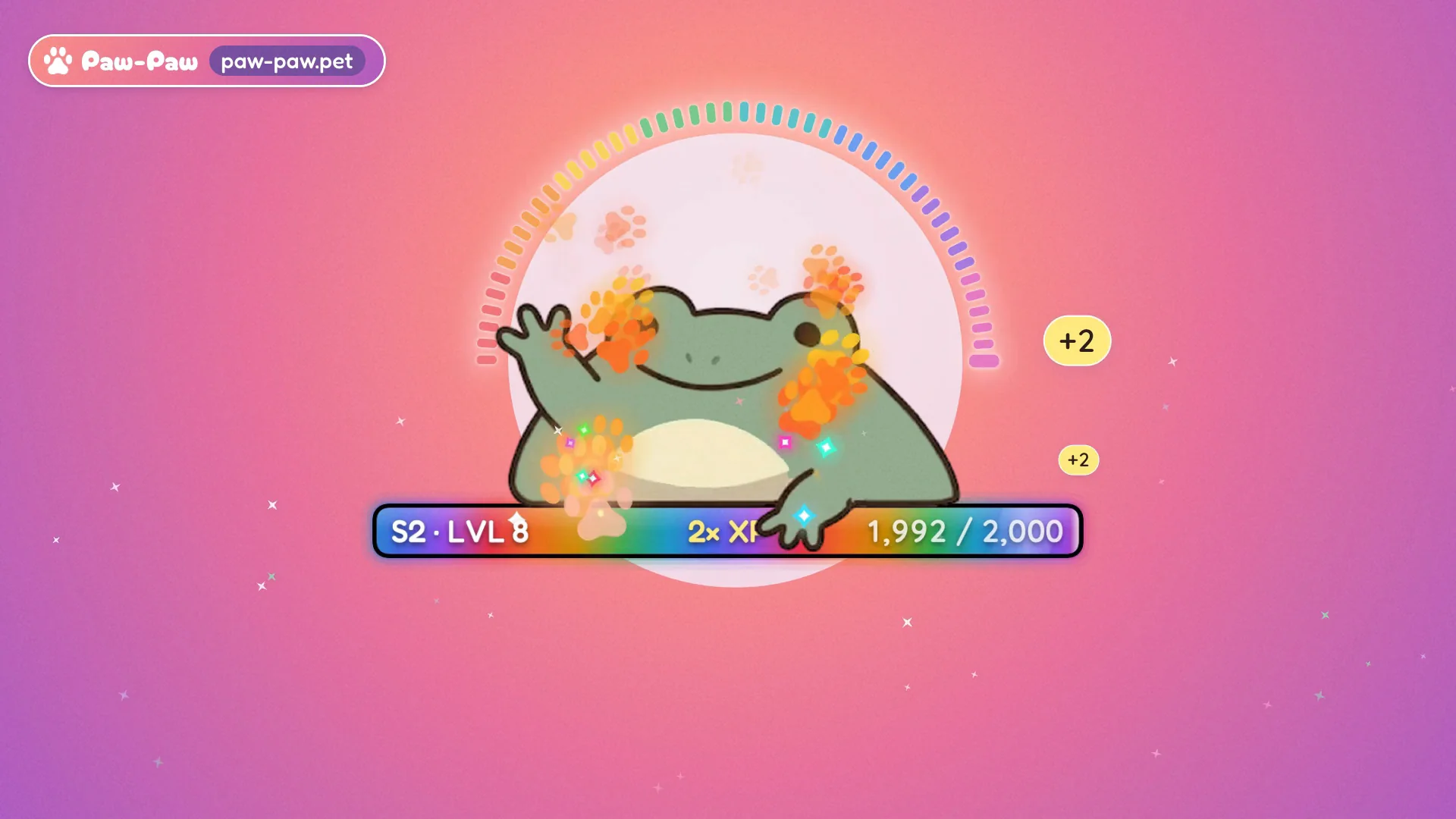
Where it doesn’t fit. Paw-Paw doesn’t block apps or websites, and it doesn’t live on your phone, so it won’t keep you off Instagram. Typing isn’t the same as focus: a busy chat earns XP too. It doesn’t plant real trees. And it is a companion, not a treatment or a productivity promise. If the dying tree is what kept you honest, keep Forest on your phone, add a blocker on your Mac, and let Paw-Paw be the friendly part. Our guide explains levels and gifts.
Paw-Paw is free, with no ads, subscription or account needed; the optional extras are artist collections you buy once inside the app. It runs on macOS 13 or later, on Apple silicon and Intel. Paw-Paw asks for Accessibility access when you turn on XP, so it can notice key presses and clicks; our install guide walks through it.
Other Mac focus apps to consider
If you want blocking or a plain timer, these five are worth a look. The descriptions come from the developers’ own sites and from Focusmo’s roundup, which is written by the makers of Focusmo. We haven’t tested them, and prices and features change, so check before you buy.
| App | What it is | Price model |
|---|---|---|
| TomatoBar | A Pomodoro timer in the menu bar. Suits you if you mainly liked seeing the time. | Free, open source |
| Flow | A minimal Pomodoro timer for iPhone, iPad and Mac, with a menu bar timer on the Mac. | Basic timer free; blocking in the paid tier |
| Session | Focus sessions for Mac, iPhone and iPad. On the Mac it blocks apps and sites, and it asks what you got done afterwards. | Subscription |
| Cold Turkey Blocker | A strict blocker for sites, apps and keywords on a schedule. Suits you if you need a wall, not a reward. | One-time purchase |
| Focusmo | A menu bar app with focus sessions, blocking and check-ins that ask what you are working on. | Free timer; paid Pro |
For more gentle Mac apps, see our cozy productivity apps for Mac and cute Pomodoro timer guides. If you liked a character that focuses with you on your phone, our Focus Friend alternative page covers that. None of these replaces Plant Together; if working alongside someone was the part that helped, see digital body doubling.
Frequently asked questions
Is there a Forest app for Mac?
Not that we could find. When we checked on October 24, 2026, Forest’s US App Store listing said Forest is available on iPhone and iPad, and its compatibility list showed iPhone, iPad and Apple Vision, with no Mac entry. For computers, the listing says browser extensions are also available.
Can I use Forest on my computer?
Through a browser extension. Forest’s site says your account and focus history sync between iPhone, iPad, Android and your browser. An extension runs inside your browser, so it works with your tabs rather than the other apps on your Mac.
Is Forest free?
The core is free: Forest’s site says the free plan includes the focus timer, app blocking and group focus, with no credit card. Forest Plus is an optional subscription with a free trial, and Forest says its price varies by region and platform. The App Store listing also shows in-app purchases and says the app contains advertising.
Does Forest plant real trees?
Yes. Forest says it funds real trees through the nonprofit Trees for the Future, paid from app revenue, and that its users have helped plant more than 2 million since 2014. The charity’s own sponsor page for Forest showed 2,153,829 trees funded when we checked on October 24, 2026.
What is a good Forest alternative for Mac?
It depends on what you liked about Forest. For a plain timer, TomatoBar is free and open source in the menu bar. For blocking, look at Session, Cold Turkey Blocker or Focusmo. If you liked watching something grow, Paw-Paw, which we make, is a free desktop pet that levels up as you type and click and has a focus timer with breaks.
Does Paw-Paw block apps like Forest?
No. Paw-Paw doesn’t block apps or websites, and nothing dies if you switch away. It grows as you type and click, offers a focus timer that suggests a break when it ends, and naps when you step away. If you need hard blocking, pair it with a blocker.
Sources
- Apple App Store (US). Forest: Focus for Productivity, by SEEKRTECH CO., LTD.
- Forest. forestapp.cc (features, plans and FAQ) and download page.
- Trees for the Future. Sponsor page: Forest App.
- Focusmo. Forest App for Mac: 6 Alternatives That Actually Work (2026). Written by a competing app’s makers.
- TomatoBar on GitHub, Flow, Session, Cold Turkey, Focusmo.

Grow something while you work
Free, with no ads, subscription or account. A tiny animal that levels up as you type, keeps a focus timer, and naps when you rest.
Download Free for MacFree · macOS 13+ · Apple silicon + Intel